🚀 Introduction: SEO Titels and Descriptions = The Fastest SEO Lever Most Hotels Never Pull
Imagine a guest searching “boutique hotel in Soho with rooftop terrace” on Google. Coincidentally, you have a boutique hotel in Soho with a rooftop terrace. Your result appears in the result list of Google, and the guest… scrolls past it. Click on another result. They don’t see your hotel website, even though you offer what they are looking for.
I have good news for you: A well-crafted SEO title and description can change that.
In this article, I have 11 tips that help you craft SEO titles and descriptions of your hotel website. This will increase the clicks to your website, support longterm growth of Google traffic, and consequently brings you more guests.
Here is actually why I can claim this: In the years I spent working in SEO for travel and tourism, improving SEO titles and meta descriptions was consistently one of the fastest levers to get more traffic from Google. Not the only lever, but a remarkably high-impact one, and one that requires no technical skills, no developer, and no budget. During one travel SEO project where we overhauled the entire website’s visibility, better titles and descriptions were a meaningful contributor to tripling organic traffic within a year. They were not the only reason of course, but a powerful contributer.
The reason is simple: even if your hotel ranks well on Google, a poorly written SEO title can mean guests scroll straight past you. Your search result is essentially a small ad for your hotel. It’s the first thing a potential guest sees. Therefore, it needs to work.
In WordPress, you will find these fields in your SEO plugin. Yoast SEO calls them “SEO title” and “Meta description,” and RankMath uses the same labels. You may also hear them called “meta title” or “title tag”. They are all the same thing. This guide uses the term SEO title throughout, so it matches exactly what you see on screen.
Here are 11 practical tips to help you write SEO titles and meta descriptions that get guests to click. They have proven to work in multiple tests I was conducting, and resulted in a measurable uplift in click-through-rate (CTR). The CTR is the share of people seeing your result on Google and actually clicking on it. Enough theory, here are the practical tips for great SEO titles and descriptions for hotel websites.
🔑 Key Highlights
✔ SEO titles and meta descriptions are your hotel’s first impression on Google. Even a small improvement can bring meaningfully more guests to your website.
✔ Hotels have a natural advantage here. Your location, features, audience, and unique character are exactly what guests search for. Use them.
✔ Most of these tips require nothing more than your WordPress SEO plugin. No technical skills, no developer, just clear thinking and good writing.
✔ Improving existing titles is often faster than creating new content. It is one of the quickest SEO wins available to a hotel managing its own website.
📍 Why SEO Titles & Descriptions Matter for Your Hotel Website
When a guest searches for a hotel on Google, your SEO title and meta description are often the first thing they see from your website. If that snippet does not catch their attention or match what they are looking for, they scroll past, even if your hotel is exactly what they need.
There is another risk worth knowing: if your titles are duplicated across pages or written too vaguely, Google may replace them with auto-generated versions pulled from your page content. That means you lose control of the message at the exact moment a potential guest is deciding whether to click. Crafting unique, well-written titles and descriptions for each page puts that control back in your hands.
Think of your SEO title and description as a mini elevator pitch for your hotel. You have just a few seconds to capture attention, show the guest you understand what they are looking for, and give them a reason to click rather than scroll.
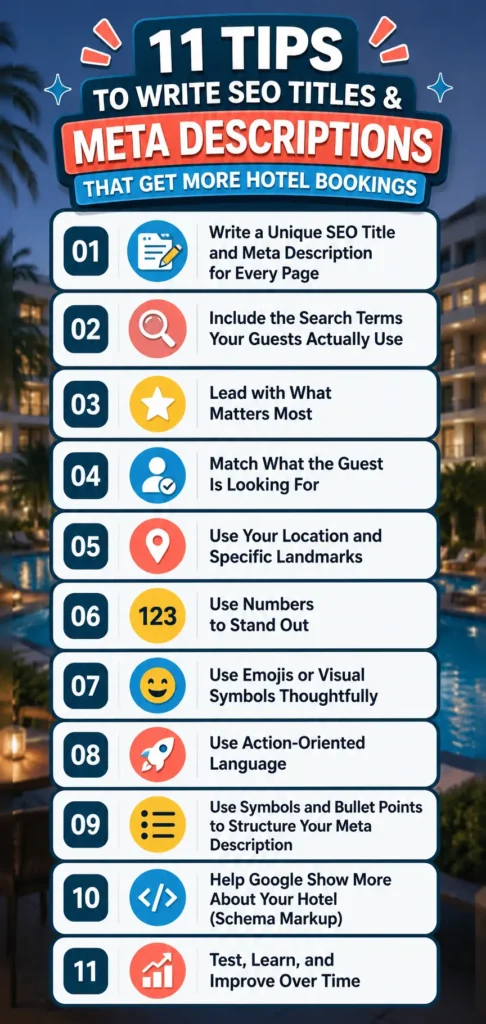
🧠 Tip 1: Write a Unique SEO Title and Meta Description for Every Page
Using the same or near-identical SEO titles across multiple pages is one of the most common hotel website mistakes. Google gets confused, guests cannot tell your pages apart, and you lose control of how each page appears in search results.
Each page on your hotel website represents a specific guest need. Your rooms page answers a different question than your spa page, which is completely different from your location page. Each of those deserves its own SEO title that reflects exactly what is on that page.
A practical way to think about it: if a guest could only read your SEO title and meta description, would they know which page they were clicking on and why it is worth clicking? If the answer is no, the title needs work.
You can absolutely use a template or formula to make writing multiple titles easier. For a hotel with many room types, a structure like [Room Type] at [Hotel Name] | [Key Feature] in [Location] helps you work efficiently. But the specific content must be unique to each page. If your titles are too similar, Google may ignore them entirely and auto-generate its own version. That version is rarely as compelling as what you would write yourself.
Example:
❌ Before: “Rooms — Dream Hotel”
✅ After: “Superior Double Room with Garden View | Dream Hotel Vienna”
🔍 Tip 2: Include the Search Terms Your Guests Actually Use
Your SEO title and meta description should speak the language of your guests. The actual words they type into Google, not the marketing language you use internally. Place your most important keyword at the beginning of the title, where it is most visible and most impactful.
For hotels, the most valuable search terms typically combine a few key ingredients. Think about how a guest would describe your hotel to a friend before they even look it up:
- Location: city, neighbourhood, or area. For example: hotel in Soho, hotel Vienna 1st district, hotel near Hyde Park
- Landmark or attraction nearby: hotel near Vienna State Opera, hotel near Tate Modern, hotel near the Sagrada Familia
- A highlight feature: hotel with indoor pool, hotel with spa, hotel with parking, hotel with balcony
- Who it is for: family hotel, romantic hotel, hotel for couples, business hotel
- The character of the hotel: boutique hotel, 4-star hotel, design hotel, historic hotel
The most effective SEO titles pack in as many of these as fit naturally. A guest who types “4-star boutique hotel Soho with wellness” already knows what they want. Your title should confirm that your hotel is the answer.
Examples:
❌ Before: “Dream Hotel — Official Website”
✅ After: “4-Star Boutique Hotel in Soho | Indoor Pool & Wellness | Dream Hotel”
❌ Before: “Family Rooms — Berghotel Tirol”
✅ After: “Family Hotel in Tirol with Kids Club & Mountain View | Berghotel”
❌ Before: “Spa & Wellness — Hotel Seebrise”
✅ After: “Hotel with Spa & Lake View in the Salzkammergut | Hotel Seebrise”
Not sure which search terms your guests actually use? Open Google and type “hotel [your city] with” or “boutique hotel [your city]” and watch the autocomplete suggestions appear. Those are real searches from real guests. You can also use Google Search Console to see which queries already bring visitors to your hotel website.
👉 For a deeper guide on finding the right search terms for your hotel: Master SEO Keyword Research
✂️ Tip 3: Lead with What Matters Most
Google typically shows around 60 characters of your SEO title before cutting it off. On mobile it can be even shorter. This does not mean you must stay within that limit, but it does mean the most important information must come first. Put your hotel type and location at the front. Features and character come after.
For meta descriptions, I actually recommend writing longer ones rather than stopping at 155 characters. Here is why: Google selects the most relevant portion of your description to show depending on what the guest searched for. A longer description gives Google more material to work with, which means your result can feel more relevant across a wider range of searches. Try to place the most important details within the first 120 characters, and then continue from there.
Example:
- SEO title: “Boutique Hotel in Vienna Near Naschmarkt | Hotel Alma” (53 characters)
- Meta description: “Stay in the heart of Vienna, steps from the Naschmarkt. Discover individually designed rooms, a rooftop garden, and breakfast made from local ingredients. Perfect for couples, solo travellers, and anyone who loves Vienna’s food and culture scene.”
The second half of that description may not always appear in search results, but when a guest searches for “romantic hotel Vienna” or “hotel near food market Vienna,” Google can pull the most relevant section and show it. That is the advantage of writing more.
🎯 Tip 4: Match What the Guest Is Looking For
Every search query has an intent behind it, and your SEO title and meta description need to match that intent precisely. If a guest expects to find a family hotel and lands on a couples retreat, they leave immediately. That sends a negative signal to Google, and you have lost a potential booking.
For hotels, guests searching on Google are usually comparing options or close to booking. Your titles should not just describe what exists on the page. They should confirm that your hotel is the right match for what the guest is searching for right now.
There is one rule that matters here: if your SEO title makes a specific promise, your page must keep it. If your title says “Family Hotel with Kids Club in Tirol,” your page should open with exactly that. If you promise five things, show five things. Mismatches between the title and the page content damage trust with guests and send poor signals to Google. The title is the promise. The page is the delivery.
Example:
- Search query: “romantic hotel Vienna for two”
- SEO title: “Romantic Hotel in Vienna for Couples | Champagne Welcome & Spa | Hotel Alma”
- Meta description: “A boutique hotel in Vienna designed for couples. Enjoy a champagne welcome, couple’s spa treatments, and a quiet room with city view, steps from the opera.”
👉 Want to understand how search intent works in practice?
📍 Tip 5: Use Your Location and Specific Landmarks
Location is one of the most powerful ingredients in a hotel SEO title, and most hotels underuse it. A guest searching for a hotel is almost always searching for a hotel somewhere specific. The more precisely you name that somewhere, the more relevant your result becomes.
Do not just write “hotel Vienna.” Think about what your location actually means to a guest:
- Are you in a specific neighbourhood? Hotel in Leopoldstadt, hotel in Notting Hill, hotel in Le Marais
- Are you near a landmark they care about? Hotel near the Vienna State Opera, hotel near Tate Modern, hotel near Central Park
- Are you in a scenic or distinctive setting? Hotel with lake view, hotel in the Alps, hotel by the sea
Including a current year in your meta description can also signal freshness. This is particularly useful if you have recently renovated, opened new facilities, or updated your offer.
Example:
- SEO title: “Hotel Near Vienna State Opera | Boutique Rooms & Breakfast | Hotel Alma”
- Meta description: “Boutique hotel steps from the Vienna State Opera and Naschmarkt. Individually designed rooms, homemade breakfast, and easy access to Vienna’s best neighbourhoods. Updated 2025.”
🔢 Tip 6: Use Numbers to Stand Out
Numbers in SEO titles catch the eye and set clear expectations. In a row of search results that all use vague language, a specific number stands out. But there is more to it than just visual appeal.
Numbers work for a few concrete reasons. They set clear expectations:
- a guest knows exactly what they are getting. They imply ease
- a structured list feels faster to absorb than a wall of text. And they build trust
- a specific number feels more considered than a vague claim. It is also worth knowing that odd numbers tend to outperform even ones. Titles with 7, 9, or 11 tips tend to feel more authentic and tested than round numbers like 10.
For hotels, numbers can appear in several useful ways:
- Star rating: 4-star hotel in [city]
- Room size: 32 m² suite with terrace
- Distance to a landmark: hotel 5 minutes from the airport
- Number of amenities: hotel with pool, spa and 3 restaurants
Example:
- SEO title: “4-Star Hotel in Vienna | Rooftop Bar & Spa | Dream Hotel”
- Meta description: “A 4-star boutique hotel in central Vienna with 48 individually designed rooms, a rooftop bar, and a full wellness area. Breakfast included.”
🎨 Tip 7: Use Emojis or Visual Symbols Thoughtfully
Visual elements in your search result — emojis, checkmarks (✓), arrows (→), stars (⭐), or separators (|) — can help your listing stand out in a page of text-only results. Used well, they make your result more inviting and easier to scan. Used carelessly, they look unprofessional.
For hotels, a restrained approach works best. A star emoji next to a star rating, a checkmark before a key feature, or a pipe separator between title elements all look clean and purposeful. Full strings of emojis are best left to social media.
Example:
- SEO title: “⭐⭐⭐⭐ Boutique Hotel in Soho | Rooftop Bar & Wellness | Dream Hotel”
- Meta description: “✓ Boutique rooms from 28 m² ✓ Rooftop bar with city views ✓ Full wellness area ✓ 5 minutes from Oxford Street. Explore rooms and availability.”
💡 Quick tip: check how your title looks on a mobile phone. Some emojis render differently across devices. If it looks cluttered on a small screen, simplify it. Also check different browsers like Chrome or Safari. I’ve seen emojis working on Chrome, but looking broken on Safari.
🗣️ Tip 8: Use Action-Oriented Language
Your meta description is not just a summary of the page. It is an invitation. Strong verbs give it energy and direction. Words like “Discover,” “Explore,” “Book,” “Enjoy,” or “Find” prompt a guest to take the next step rather than just read and scroll on.
For hotels, action language pairs naturally with a guest benefit. Do not just list what you have. Describe what the guest will experience when they arrive.
Example:
❌ Passive: “The hotel is located in central Vienna and has a wellness area.”
✅ Active: “Discover a boutique retreat in central Vienna. Unwind in our rooftop wellness area and wake up to a homemade breakfast.”
The second version creates a small moment of desire. That is what gets the click.
✅ Tip 9: Use Symbols and Bullet Points to Structure Your Meta Description
You can use symbols like ✅ or • to create a visual list structure inside your meta description. Google does not always display them as formatted bullet points, but that is not the only reason to use them. Even when they appear as plain characters in a regular text result, they help guests scan your description much faster than an unbroken sentence.
There is also a less obvious benefit: a well-structured description helps Google understand and index your content more effectively. Clear, organised text signals what the page is about, which supports your overall SEO. For hotels, this format works especially well for room pages, amenity pages, and offer pages where you want to communicate several selling points at once.
Example meta description for a hotel rooms page:
✅ Rooms from 22 m² with city or garden view ✅ Queen or king bed, walk-in shower, blackout curtains ✅ Air conditioning, free Wi-Fi, workspace ✅ Breakfast available from 7:00, book direct for best rate
A guest scanning this on their phone gets the key information in two seconds. That is the goal.
🧩 Tip 10: Help Google Show More About Your Hotel (Schema Markup)
This tip is slightly more technical than the others, but there is one action every hotel owner can take today without touching any code, so stay with me.
Schema markup is structured information you add to your website that tells Google extra details about your hotel. In return, Google can display that information directly in search results as what is called a “rich result.”
Depending on your pages, schema can unlock:
- ⭐ Star ratings visible directly below your hotel name
- 📍 Address, map, and local business information
- 🕐 Check-in and check-out times
- ❓ FAQ sections shown directly in search results
- 📷 Images or thumbnails next to your result
Why this matters for your hotel:
- Rich snippets stand out more than plain text results and give guests immediate useful information.
- Visual elements like star ratings and images build trust before a guest even visits your website.
- Schema helps your pages qualify for enhanced placements in Google Search, including Google Discover and featured snippets.
- On mobile, these enhancements often appear more prominently than standard results — which matters a lot, since most guests compare hotels on their phones.
Of all these enhancements, images are probably the most powerful for hotels. Humans are visual, and an image-enhanced result grabs attention immediately, especially on a small screen. Google increasingly shows thumbnail images in search results for local businesses and travel content. A beautiful room photo or a scenic terrace shot next to your result can be the difference between a scroll and a click. If you are ranking for a competitive search like “boutique hotel Vienna,” and your result shows a stunning room image while the others do not, your chances of getting that click are significantly higher.
What this can look like for a hotel page:
- ⭐ 4-star rating shown directly in search results
- 📍 Address and neighbourhood visible without clicking
- 🕐 Check-in from 15:00 shown in the result
- 📷 Room or terrace photo appearing next to the title
What you can do yourself in WordPress:
Both Yoast and RankMath support schema markup for local businesses. In RankMath, open your page settings and look for the Schema tab. You can add a “Local Business” or “Hotel” type and fill in your star rating, address, and opening hours. In Yoast, this is found in the Local SEO settings. To increase the chances that images appear next to your result, place high-quality images directly on the relevant page — Google picks them up automatically.
Tools to help you:
- Google’s Rich Results Test — check whether your pages are eligible for rich features
- Schema.org — explore all supported markup types
- Google’s structured data documentation — full reference for what Google supports
💡 One important rule: only mark up information that is actually present and accurate on the page. Google cross-checks, and marking up data that does not exist on the page can result in penalties.
💡 Simplest starting point: make sure your Google Business Profile is complete and verified. This alone enables many rich result features for Google Search and Google Maps, without any additional code on your website.
🧪 Tip 11: Test, Learn, and Improve Over Time
Writing a good SEO title once is a solid start. Improving it over time is where the real gains come from.
Google Search Console shows you exactly which hotel pages are getting impressions in search results but few clicks. This combination — high impressions, low CTR — is a clear signal that your meta title or description is not compelling or relevant enough. Those are the pages to start with. The process is straightforward:
- Open Google Search Console and go to the Performance tab
- Look for pages with high impressions but low CTR (click-through rate)
- Check the current SEO title and meta description for that page
- Rewrite them using the tips in this article
- Wait 2 to 4 weeks and check whether CTR has improved
For example: if your spa page appears hundreds of times in Google search results each month but very few guests click on it, the problem is likely the title. It may say something generic like “Spa | Hotel Name” when it could say “Hotel with Alpine Spa & Sauna in Tirol | Hotel Name.” Rewriting that title takes five minutes. The improvement in clicks can be substantial, with no other changes to the page.
This kind of regular review is one of the highest-return SEO habits a hotel can build. Small titles. Big difference.
👉 Need a refresher on how to use Google Search Console for your hotel? How to Set Up Google Search Console for Your Hotel WordPress Site
📋 Quick SEO Meta Tag Checklist
✅ Unique SEO title and meta description for every hotel page
✅ Primary keyword (hotel type + location) at the start of the title
✅ Specific location, neighbourhood, or nearby landmark included
✅ Key hotel features where relevant: pool, spa, breakfast, parking
✅ Target audience if applicable: families, couples, business guests
✅ Most important information within the first 60 characters of the title
✅ Longer meta description written so Google can pick the most relevant portion
✅ Action-oriented language in the meta description
✅ Numbers or star rating included where possible
✅ Emojis or symbols used cleanly and sparingly
✅ Schema markup in place for star rating, local business info, and images
✅ Regular review in Google Search Console to improve underperforming pages
🏁 Conclusion: Your Search Result Is Your First Impression
A guest who finds your hotel on Google has not visited your lobby, read your reviews, or seen your rooms yet. All they have is a title and two lines of text. That is your first impression, and it is worth crafting carefully.
The good news is that improving your hotel’s SEO titles and meta descriptions is one of the most accessible SEO tasks there is. No technical skills required. No developer needed. Just your WordPress SEO plugin, a clear understanding of what your guests are searching for, and the 11 tips in this article.
Start with your most important pages: homepage, room pages, and your top amenity pages. Use Google Search Console to find the pages that need the most attention first. Then revisit them over time, because small improvements add up.
If you have questions, want a second pair of eyes on your hotel’s current titles, or just want to talk through your SEO strategy, I would love to hear from you. ☕
🙋♀️ Frequently Asked Questions: SEO Titles & Meta Descriptions for Hotels
1. What is an SEO title for a hotel website?
An SEO title (also called a meta title or title tag) is the clickable headline that appears in Google search results. For hotels, it is one of the most important places to communicate your hotel type, location, and key features, and to give guests a reason to click. In WordPress, you set it in your SEO plugin (Yoast or RankMath) under the field labelled “SEO title.”
2. How long should a hotel's SEO title and meta description be?
For the title, aim for around 55 to 60 characters so the full title is visible in search results. Put the most important information first, usually your hotel type and location. For the description, I recommend writing longer ones rather than stopping at 155 characters. Google selects the most relevant portion depending on what the guest searched for, so more material gives you better coverage across different searches. Just make sure the key details appear within the first 120 characters.
3. What should a hotel include in its SEO title?
The most effective hotel SEO titles combine hotel type or character (boutique, 4-star, wellness), location (city, neighbourhood, or nearby landmark), and a key feature or unique selling point (spa, rooftop, breakfast included, family-friendly). Pack in as many relevant details as fit naturally, without making it sound forced.
4. How do I write meta descriptions for different hotel pages?
Each page needs a different approach. For room pages, focus on specifics: room size, bed type, view, and what is included. For amenity pages like spa or breakfast, describe the experience a guest will have. For the homepage, communicate your hotel’s overall character, location, and what makes it the right choice. For offer or package pages, highlight the value and create a sense of availability.
5. Does improving SEO titles actually bring more website traffic?
Yes, it is one of the fastest traffic levers available to a hotel website. A better SEO title does not change your ranking position, but it can significantly increase the share of guests who click on your result. Even moving from 2% to 4% click-through rate on a page that gets 1,000 monthly impressions means doubling the traffic to that page, with no other changes needed.
6. How do I know which hotel pages need better SEO titles?
Open Google Search Console and go to the Performance tab. Look for pages with high impressions but low CTR (click-through rate). High impressions with low CTR is a clear signal that the title or description is not working. Guests see your result but are not compelled to click. Start there, rewrite the title, and check back in a few weeks.
7. What if Google rewrites my meta description?
Google often rewrites meta descriptions to better match what the user actually searched for. If this keeps happening on a specific page, treat it as useful feedback: your description may not be closely aligned with the searches that trigger that page. The fix is to review which queries bring impressions to that page in Google Search Console, and then rewrite the description to reflect those searches more directly.
The Prompt used To Create this article
I want to be transparent on how this article was written, so below you will find the prompt to create this article. Of course, I asked for adjustments afterwards, but here is the initial input:
Check the prompt
Can you restructure the article below, so it fits the structure for blog articles for my website, www.patricklindbichler.com? I want to go in the direction of making the articles a bit longer, so people find clear information. The article should be clear and easy to understand, especially for people who are new to the topic. Still it should stay as compelling as the original article and also have the same length. It should be written in good American English, using not too complicated words so that even non-native English speakers can follow along easily. The tone should reflect my expertise as a thought leader in SEO, content creation, and leadership. Feel free to use examples from my experience as proof points and explain them in a clear und compelling way.
I am typically a positive and humorous person, so the writing style can be upbeat with a few jokes here and there—just nothing offensive. The article should be engaging, fun to read, and educational. Please follow the structure outlined below, and feel free to expand on the points with additional context to ensure that each paragraph presents clear arguments.
Structure of the article:
- Introduction: Start with a paragraph that summarizes the topic and grabs attention. You can make a strong statement or ask a thought-provoking question that will be answered later in the article.
- Key Highlights (3-4 bullet points): Include a few short bullet points summarizing the key takeaways of the article. Each point should be 1-2 sentences long.
- Main Content: Break the main part of the text into several text parts, each with a heading optimized for SEO and AI search. Each text part can have 1-3 paragraphs with 5-20 sentences each, depending on how much content is needed to explain the point clearly and bring the argument across. The paragraphs should be easy to read and compelling.
- Conclusion: Wrap up the article by summarizing the main points and inviting readers to reach out if they have any questions or want to learn more.
- FAQs: Include 5 frequently asked questions about the topic, with clear answers that add value to the reader.
Formatting:
- Use bold for key points, ensuring every 4th or 5th sentence has something in bold for emphasis.
- Add emojis throughout (but no more than 50 total) to make the article more visually appealing.
- If you include practical tips, illustrate them with real-life examples to make the content relatable.
- Please make the article a minimum of 1800 words. Feel free to ask me if you need more input or add information and context where you feel it’s necessary to convey a message or provide more clarity.
Goals:
- Please optimise the article for SEO. Give recommendations for search terms to include and integrate them into the titles of the paragraphs and the beginning of the article.
- Please make the article engaging so people are intrigued to read but also enjoy reading.
- What readers learn in the article, should be easy to apply for them because everything is explained clearly and has examples
Please restructure the following article with the guidelines above and by making each paragraph more compelling and including a practical example:
10 Essential Tips for Crafting Compelling SEO Meta Titles and Descriptions
SEO or meta titles and descriptions play a crucial role in attracting potential visitors to your webpage. They serve as the virtual shop window of your page, offering the first glimpse of what your content has to offer. Naturally, you want your search results on Google to stand out and captivate the audience, compelling them to click and explore your page further. In this article, we’ll provide 10 invaluable tips for crafting meta titles and descriptions that can significantly boost your click-through rates (the share of people clicking on your search result). All of them showed a positive impact on the organic traffic of several web pages in practice.
1. Make them unique
Title and description should be very specific to the page to already provide information to the customer of what they can expect on the page. It’s essential to ensure that your meta titles and descriptions are unique to each page. Google may not show you meta titles and descriptions if the search results for multiple pages are too similar. It will then use information from your content on the page instead. While you can use parts of your search result as a template, make sure they accurately represent the content of the respective page.
2. Include the targeted search term or keyword
The meta title and description are key places to include your targeted search term. Ideally, position them at the beginning of both to catch users’ attention right away. Incorporating relevant keywords enhances your page’s visibility and helps users find precisely what they are looking for.
Example:
- Before: Summer Activities for Families
- After: Family-Friendly Summer Activities in California (2025 Guide)
[Link to article about placing search terms]
3. Keep the title and description precise
Google typically displays 60 characters or less for the title and around 155 characters for the description. While these limits may seem restrictive, you can still create impactful titles and descriptions. Longer titles and descriptions work if they contain essential information and the targeted search term at the beginning. Longer descriptions also give Google room to select the most relevant part based on user searches, so I generally recommend having longer descriptions.
Tip: Try to place the most important parts within the first 120 characters of the description, so they are not cut off.
4. Describe clearly what is on your page & Align meta with search intent
Title and description should reflect what is actually on the page. Misleading titles and descriptions can lead to a poor user experience, causing visitors to leave your page. This can negatively impact your rankings or even result in Google not displaying your page at all. For example, if your page is about “cheap bus tours,” don’t label it as “luxury tours.”
Craft titles and descriptions that align with the user’s goal — whether it’s informational (looking for answers), navigational (finding a site), or transactional (making a purchase).
Example:
- For “how to start a blog,” a good title would be:
- Start a Blog in 5 Simple Steps – Beginner’s Guide 2025
5. Use locations and dates
Incorporate locations and dates for added relevance. Many users search for things in combination with a specific location, such as “restaurants in Sydney.” Including recognizable locations can attract more clicks. Indicating dates, such as the current year or article publishing date, signals that your content is up-to-date and relevant.
Example:
- Best Yoga Retreats in Bali – Updated for 2025
6. Use numbers
Numbers grab attention and increase click-through rates. While there’s no exact data, adding numbers to your meta titles and descriptions can boost engagement. Many successful companies use numbers in their titles to draw users in.
Example:
- 7 Proven Tips to Boost Website Traffic
7. Use visual elements
Visual elements set you apart and capture attention. Icons, checkmarks, and even emojis (where supported) can differentiate your search results from others. They make your content visually appealing and enticing.
Example:
- ⭐ 10 Best Cafes in Paris – Traveler’s Choice 2025
Make sure to test how emojis or special characters display across different browsers and devices.
8. Use action-oriented language
Use compelling verbs that prompt users to take action. Words like “Discover,” “Learn,” “Explore,” “Boost,” and “Unlock” can make a big difference in persuading users to click.
Example:
- Explore the Top 10 Productivity Apps for Remote Teams
9. Use bullet points in the description
Bullet points convey information efficiently. Given the limited space in descriptions, bullet points are a great way to provide more details than full sentences. Visual elements like checkmarks can help separate these points and make them stand out.
Example Description:
- ✅ Affordable pricing
- ✅ Expert instructors
- ✅ Updated for 2025
10. Provide snippets / structured data (Schema Markup)
Enhance your search results with informative snippets. Incorporating images, ratings, or prices can make your results more appealing and informative. Snippets give users a glimpse of what your page offers and can lead to higher click-through rates. To enable this, implement structured data using schema.org markup.
Structured data allows you to highlight specific content such as:
- Reviews (stars)
- Recipes (ingredients and cooking time)
- Events (dates and location)
- Products (prices, availability)
Adding this data helps Google show rich snippets that visually enhance your listing.
Very attractive are images in your search result. Users already get a first impression of what to expect on your page and get intrigued. Simply place high-quality images on your page and search engines will pick them up and show them. To increase the chances that images appear in your search result, you can add appropriate structured data (schema markup).
11. Monitor and A/B test your titles
Don’t rely on guesswork. Use tools like Google Search Console to track click-through rates (CTR) for different meta titles. Experiment with A/B testing to see which titles perform better and update accordingly.
In conclusion
Optimizing your meta titles and descriptions is a critical aspect of your SEO strategy. By following these fourteen tips, you can create compelling and effective search results that entice users to visit your webpage.
Quick Checklist
Add a checklist of the 12 points above
FAQs
- How important are meta titles and descriptions for SEO? Meta titles and descriptions are crucial for SEO as they serve as the first impression of your page on search engine results. They can significantly impact click-through rates and help your page rank higher.
- Can I use the same meta title and description for multiple pages? It’s best to make each meta title and description unique to the page’s content. Using similar titles and descriptions for multiple pages may result in Google not displaying your content. To create multiple titles and descriptions efficiently, you can reuse parts of the title and descriptions for multiple pages. In addition, you can auto generate the unique parts of the descriptions with information on the page.
- What is the ideal character limit for meta titles and descriptions? Google typically displays 60 characters or less for titles and around 155 characters for descriptions. Staying within these limits ensures that your content is fully visible in search results. In my opinion, you can still create longer titles, if you keep the most important parts at the beginning. For description, I recommend creating longer descriptions so Google can pick the most relevant part out of it.
- How can visual elements like emojis be used effectively in meta descriptions? Visual elements like emojis can grab attention and make your search results more appealing. However, ensure they display correctly across different browsers and devices.
- Why should I include dates in my meta descriptions? Including dates in meta descriptions signals that your content is up-to-date and relevant, encouraging users to click on your page for current information.
- How do I write meta descriptions for blog posts vs. product pages? Blog posts should summarize the value or insight the reader will gain. Product pages should highlight benefits, features, or prices that encourage purchase.
- What if Google rewrites my meta descriptions? Google often rewrites meta descriptions to better match a user’s query. To minimize this, write descriptions that are highly relevant, keyword-rich, and accurate to the content of the page.