Introduction: You Search for Your Hotel on Google and Nothing Comes Up
You have built a hotel website. The rooms look beautiful, the location page is clear, breakfast is described, and the booking button is right there. Then one day you type “hotel Vienna” into Google or “boutique hotel near the Naschmarkt” and your hotel is simply not there. Competitors you know well appear. Booking.com appears. But your own website? Nowhere.
Or maybe the sign is subtler. Guests book through OTAs, through phone calls, through walk-ins but almost never directly through your website. You feel something is not working, but you are not sure what. 🤔
This is one of the most common frustrations I hear from hotel owners. And the good news is that it is almost never a mystery. There are clear, diagnosable reasons why a hotel website does not appear on Google and clear steps to fix each one.
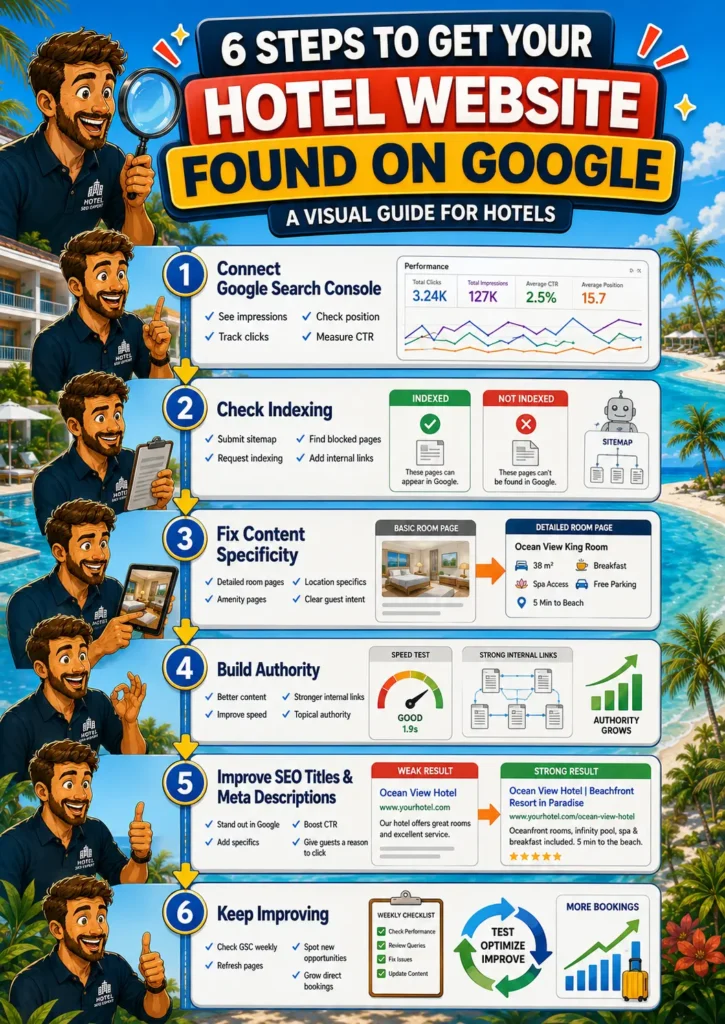
In this article I will walk you through all six steps, in order of priority. You do not need to be technical. You just need to know where to look. Let’s go. 🚀
Key Highlights in this article
Before we dive in, here is what this guide will help you fix, step by step.
✔ You will start with Google Search Console, the free tool that tells you exactly what Google can and cannot see on your hotel website. Without it, you are completely blind to what is going wrong.
✔ You will learn why indexing is the single most important starting point. If your hotel pages are not in Google’s index, no guest will ever find them through search, no matter how good the content is.
✔ You will see the most common content mistakes that keep hotel pages invisible on Google, including generic room descriptions, missing amenity pages, and no location specifics. These are the gaps I see on almost every hotel website I audit.
✔ You will understand why getting impressions but no clicks is a search result problem, not a content problem, and how to fix it quickly with better SEO titles and meta descriptions.
✔ The goal is simple: a clear, step-by-step process that takes your hotel website from invisible to consistently found by guests who are already searching for exactly what you offer.
Step 1: Connect Google Search Console to See What Is Actually Happening
If you are not measuring, you are guessing. The first step to fixing your hotel website’s Google visibility is connecting it to Google Search Console (GSC). It is free, it is made by Google, and it shows you exactly what Google can and cannot see on your site.
Once connected, go to the Performance tab. This is where you will find the numbers that actually matter:
- Impressions: how often your hotel website appears in Google search results
- Clicks: how often a guest actually clicks through to your website
- Average position: where your pages rank in the list of results
- CTR (click-through rate): the percentage of guests who see your result and click on it
If all of these are at or near zero, do not panic. That is exactly what this guide is for.
👉 Never connected Google Search Console before? This step-by-step guide walks you through the full setup for a hotel website: How to Set Up Google Search Console for Your Hotel Website
💡 Pro tip: hover over the small question mark icons inside Google Search Console whenever something is unclear. They are surprisingly helpful mini explanations built right into the tool. And if you are still stuck, feel free to send me a message. 😉
Want to improve more than just this one page?
This guide focuses on one specific part of your hotel website. But direct booking growth usually comes from improving the full system: your positioning, homepage, room pages, feature pages, Google visibility, AI search readiness, and booking journey.
Step 2: Check If Your Hotel Pages Are Actually Indexed by Google
Here is something many hotel owners do not realise: having a website and being visible on Google are two completely different things. Google has to actively discover, crawl, and index your pages before they can appear in search results. If that has not happened, your hotel is invisible no matter how well written your room descriptions are.
Go to the Pages tab under the Indexing section in Google Search Console. You will see which pages Google has indexed and which it has not. Only indexed pages can appear in Google search results.
In my experience working with hotel websites, there are several different reasons why important pages end up missing from the index and it is worth checking all of them:
Google may simply not know your website exists yet
If your hotel website is new, or if you have never submitted a sitemap, Google may not have had a reason to crawl it yet. A sitemap is essentially a map of all your pages that you hand directly to Google. Submit one via the Sitemaps tab in Google Search Console. Most website builders generate one automatically it is usually found at yourdomain.com/sitemap.xml. If you are not sure how to find or submit yours, search “how to create a sitemap for [your website platform]” and you will find clear instructions.
Key hotel pages may not be linked to from anywhere
Google follows links to discover pages. If a room page, a spa page, or a parking page has no other page linking to it, Google may never find it. The fix is simple: link to your most important pages from your homepage, and make sure every key page is reachable through a logical navigation path. Think of it as giving Google a clear trail to follow through your website.
For hotels specifically: your room pages are the most important pages to book. Link to them from your homepage, from your amenity pages, and from any offer or package pages. The more internal links point to a room page, the stronger the signal to Google that this page matters.
🛠️ You can also request indexing manually
If you have a specific page that is not yet indexed a newly published room page, a freshly updated spa page you can request indexing directly in Google Search Console. Paste the URL into the search bar at the top of the tool, then click “Request Indexing.” In most cases, Google crawls and indexes the page within a few days. I do this every time I publish something important. It works reliably. 💡
🧱 Some pages may be accidentally blocked
Occasionally a technical setting on a website tells Google not to index certain pages. This can happen by mistake during a website build or update. In Google Search Console, the Pages report will show you if any pages are marked “noindex” or blocked by robots.txt. If an important page is flagged this way, it needs to be unblocked.
✅ Bottom line: if your hotel pages are not in the index, they will not be found. Use the sitemap, internal links, and manual indexing requests to make sure every page that matters is visible to Google.
Step 3: Indexed but Still No Impressions? Here Is Why Hotel Pages Stay Invisible
Your hotel pages are indexed but they still do not appear in Google search results. This is the step where most hotel websites lose the most value, and it is almost always a content problem rather than a technical one.
When I look at hotel websites that are indexed but not generating impressions, the pattern is almost always the same: the pages are too generic for Google to know when to show them.
The most common hotel content mistake: missing specifics
Google cannot show your hotel for a search it does not understand your page is relevant for. And relevance comes from specificity. Here are the specific gaps I see most often on hotel websites:
Generic room descriptions that could belong to any hotel anywhere. A page that says “comfortable double room with modern amenities” gives Google nothing to work with. A page that says “Double room with king-size bed and Eiffel Tower view, 28 m², walk-in shower, blackout curtains, and breakfast from 7:00” gives Google something very specific to match against guest searches. That second version can appear for searches like “hotel room with Eiffel Tower view” or “double room Paris king-size bed” searches the first version would never rank for.
No mention of location specifics, landmarks, or neighbourhood. Guests do not just search for “hotel Vienna.” They search for “hotel near Vienna State Opera,” “hotel in Leopoldstadt,” “boutique hotel near Naschmarkt.” If your pages do not mention your neighbourhood, your nearby landmarks, and what makes your location valuable to a guest, Google does not know to show you for those searches.
No dedicated pages for key amenities. A very common mistake is having one generic “highlights” page that mentions spa, parking, breakfast, gym, and meeting rooms all together. From Google’s perspective, that page does not clearly answer any one guest search. A guest searching “hotel with spa Vienna” should land on a dedicated spa page that describes the spa in detail. A guest searching “hotel with parking near the centre” should land on a parking page. Each amenity that a guest might specifically search for deserves its own page.
No clear target audience signals. If your hotel is particularly well suited for families, couples, or business travellers, that should be stated clearly on the relevant pages. A guest searching “romantic hotel Vienna for couples” cannot find you if your website never says you are a romantic hotel for couples.
👉 For a practical guide on how guests search and what keywords to use: SEO for Hotels: 5 Beginner Tips to Get Found on Google
👉 For guidance on how to structure your hotel website so each page can rank for specific searches: How to Structure a Hotel Website for SEO, AI, and Direct Bookings
Other reasons a hotel page might have no impressions
Beyond content specificity, there are a few other possibilities worth checking:
Nobody is searching for that exact topic. Rare, but possible for very niche content. If so, broaden the topic slightly or connect it to a more searched-for term.
The main content is not visible in the HTML. If your page content is loaded via JavaScript or hidden in a way that is not in the page source, Google may not be able to read it. Right-click on any page and select “View Page Source” to check whether your text content is visible there. If it is not, it needs to be.
The page is too slow or broken. Google’s willingness to show a page is partly determined by how well it performs. Use Google PageSpeed Insights to test any pages with no impressions. If they are in the red zone, fixing performance can unlock visibility. We will cover this in more detail in Step 4, where page speed is one of the key levers for building your hotel’s authority on Google.
Step 4: Getting Impressions but Still No Clicks? Build Your Hotel's Authority
If your hotel pages are generating impressions but ranking too low for guests to click through typically below position 20 or 25 it means Google is aware of your content but not yet confident enough to show it prominently. This is normal for newer websites and newer pages. Building authority takes time, but there are clear things that accelerate it.
Create specific, helpful content that genuinely answers guest searches
The better a page answers the specific question a guest is asking, the faster Google recognises it as a relevant result. For hotels, this means every important page should answer one clear guest question:
- Spa page: what does the spa offer, what treatments are available, who is it for?
- Breakfast page: what is served, what time, is it included in the room rate?
- Parking page: is there parking, how much does it cost, how close is it?
- Family rooms page: what makes this room family-friendly, what age groups does it suit, what is nearby for children?
A page that answers its question completely and specifically will outperform a page that gestures vaguely at the topic. Every time. 📈
👉 For a practical framework on what makes hotel content genuinely useful: The 4 Pillars of Creating Great Content
👉 Here I have guidelines on how you can create great content for specific hotel pages:
- How to Structure a Hotel Homepage for SEO, AI, and Direct Bookings
- How to Write Hotel Room Descriptions That Drive Direct Bookings (With Examples & Checklist)
- How to Create a Hotel Breakfast Page That Gets Found and Gets Guests Excited
- How to Create a Hotel Gym Page That Gets Found on Google + AI and Gets Guests Booking
Match the search intent of the guest exactly
Understanding what a guest actually wants when they type a query into Google is one of the most important things you can do for your hotel SEO. A guest searching “family hotel Vienna” is not looking for your general hotel overview they want to know whether your hotel is right for their family, what the rooms look like, what is nearby for children, and whether breakfast is family-friendly.
If your page matches that intent precisely, Google notices. Guests stay longer, explore more pages, and do not immediately hit the back button. Those engagement signals push your page higher over time.
👉 How to think about search intent for hotel pages: Hotel Search Terms: How Travelers Actually Find Hotels Online
Make sure your website loads fast on mobile
A large share of guests compare hotels on their phones. If your website is slow or unstable on mobile, guests leave before they read about your rooms and Google tracks that behaviour. Open Google PageSpeed Insights and test your most important pages. If any are in the red zone, it is worth asking your developer to address the issues flagged there. The most common cause for hotel websites is large, unoptimised image files room photos, spa shots, food photography that add unnecessary seconds to loading time.
Build topical authority with related content
One well-written room page will not make your hotel an authority on anything. But a collection of pages covering your rooms, your amenities, your neighbourhood, your location, your target audiences, all linking to each other logically, tells Google that your website is a comprehensive resource for guests considering your hotel. Over time, that depth lifts even your most competitive pages.
One important priority to keep in mind: your hotel pages always come first. Your rooms, your amenities, your spa, your breakfast, your parking, your location. These are the pages that directly support bookings, and they should always be more developed, more specific, and more carefully maintained than any blog or supplementary content. A neighbourhood guide is a powerful addition, but not if your room pages are still thin and generic.
A practical way to start with the neighbourhood content once your core hotel pages are solid: write about the best restaurants nearby, the museums within walking distance, the local markets, the transport connections. Each of those pages links back to your hotel pages. Guests searching for things to do in your area find your content and find your hotel in the process.
👉 For a detailed guide on how to structure your hotel website as a set of connected content clusters: How to Make Google’s Ranking Systems Work in Favour of Your Hotel Website
Use other channels to build initial momentum
Early traffic sends trust signals to Google. In the early stages of a hotel website, it helps to use other channels to get guests to your pages:
- Share new pages on your social media channels
- Ask partners local restaurants, tour operators, nearby attractions if they would be willing to link to your hotel website
- Make sure your Google Business Profile is complete and links back to your website
- List your hotel on relevant local tourism platforms and directories, where your listing remains visible long-term
Get practical hotel website ideas in your inbox
In my newsletter, I share clear, actionable ideas for hotel owners and marketers who want more guests to find, trust, and book their hotel directly.
Step 5: Good Rankings but Low Clicks? Fix Your Search Result
Your hotel is appearing in the top 10 results for a relevant search but barely anyone is clicking. This is a search result problem, not a content problem. Your SEO title and meta description are not compelling enough to make a guest choose your result over the others on the page.
Think of your search result as a small ad for your hotel. It is the first thing a potential guest sees. If it does not communicate clearly what your hotel is, where it is, and why they should click they will not. 📣
The most effective hotel search results combine location, hotel type, and a specific feature or benefit in the title and use the description to answer the guest’s next question and invite them to explore.
❌ Weak: “Dream Hotel Official Website” ✅ Strong: “4-Star Boutique Hotel in Soho | Indoor Pool & Wellness | Dream Hotel”
❌ Weak: “Double Room Hotel Alma Vienna” ✅ Strong: “Double Room with Naschmarkt View | Hotel Alma Vienna | From €139”
The second versions give a guest something specific to react to. They confirm the location, hint at the experience, and make the page feel worth clicking.
Also revisit whether your page is actually delivering what your title promises. If your title says “Romantic Hotel for Couples in Vienna” but the page opens with a generic welcome message, guests leave immediately. That bounce signal hurts your ranking. The title makes a promise. The page keeps it.
👉 For a complete guide to writing hotel SEO titles and meta descriptions that get clicks: SEO Titles & Meta Descriptions for Hotels: 11 Tips to Get More Guests from Google
Step 6: You Have Done the Essentials Now Keep Improving
If you have worked through all five steps, you have done more than most hotel websites ever do. From here, the task is not to find a new fix it is to keep improving what is already working. SEO is a continuous cycle, not a one-time project. 🔄
📈 Check Google Search Console regularly
Come back to your Search Console at least once a week and ask these questions:
- Are impressions increasing across my key hotel pages?
- Which searches are already bringing guests to my website?
- Are there pages with high impressions but very low CTR? Those need better SEO titles and descriptions.
- Are there searches I am appearing for that I have not yet optimised for? Those are new content opportunities.
🔄 Keep your hotel pages fresh
Use seasonal price updates as a trigger to refresh your key pages: update photos, refine descriptions, add new guest questions and answers. Add a review section to your room and amenity pages and keep it updated. Each new review adds fresh content to the page automatically.
⭐ Strengthen your internal link structure
- As you add new content, make sure every new page is linked to from at least one existing important page. No page should be an island. Your most important room pages should be linked from your homepage, your amenity pages, and your offer pages.
🖐 Reduce OTA dependency over time
Every improvement to your hotel website’s Google visibility is a step toward fewer bookings through OTAs and more through your own direct channel. That means more revenue, more guest relationships, and more control.
👉 For a strategic guide on how direct bookings and Google visibility work together: How Hotels Can Reduce Their Dependency on Booking.com
✅ Quick SEO Troubleshooting Checklist for Hotel Websites
Check | Question to Ask | Action to Take | Step |
|---|---|---|---|
| 🔍 Search Console | Is it connected? | No: connect it now. You are flying blind without it. | Step 1 |
| 🔎 Indexing | Are key hotel pages indexed? | No: submit sitemap, add internal links, request indexing manually. | Step 2 |
| 📈 Impressions | Are there any? | No: add location specifics, dedicated amenity pages, and specific room descriptions. | Step 3 |
| 📉 Average Position | Is it under 25? | No: improve content depth, page speed, and topical authority. | Step 4 |
| 🎯 CTR | Is it above 1%? | No: rewrite SEO titles and meta descriptions for your key hotel pages. | Step 5 |
| 🚀 Growth | Are metrics improving? | No: return to Search Console, find the weakest pages, and improve them one by one. | Step 6 |
Want more hotel website ideas like this?
I regularly share practical thoughts on hotel SEO, AI search, direct bookings, website clarity, and how independent hotels can become easier to find and book directly.
🏁 Conclusion: Your Hotel Website Can Win on Google But It Takes Clarity
Getting traffic from Google is not magic. It is a clear process: make sure Google knows your pages exist, make sure those pages are specific enough to match real guest searches, and make sure your search result is compelling enough to earn the click.
The hotel owners I see succeed on Google are not the ones with the most technically sophisticated websites. They are the ones who have taken the time to make their website genuinely useful with specific room descriptions, dedicated amenity pages, clear location signals, and search results that give guests a real reason to click.
Work through these six steps one at a time. Use Google Search Console to track your progress. And remember: every improvement you make to your hotel website’s Google visibility is a direct booking that does not go to an OTA.
If you have questions about any of these steps, want a second opinion on your hotel website, or just want to talk through where to start I would love to hear from you. ☕
FAQs: Hotel Website Not Showing on Google
1. I searched for my hotel on Google and it does not appear. What should I do first?
Start by opening Google Search Console and checking the Indexing report. If your homepage is not indexed, follow the steps in Step 2 of this article. If it is indexed but not ranking, the issue is likely content specificity your pages may be too generic for Google to know when to show them. Step 3 covers exactly that.
2. My hotel homepage appears on Google but my room and spa pages do not. Why?
This is very common. Your homepage is usually the most linked-to page on your website, which makes it easiest for Google to find and index. Other pages only get indexed if Google can discover them usually through links from the homepage or from other pages. Check that all your important room and amenity pages are linked from your homepage and from each other. Then request manual indexing for any missing pages via Google Search Console.
3. My hotel website is indexed but gets no impressions for hotel searches in my area. What is wrong?
The most likely cause is that your pages are not specific enough. Google cannot show your hotel for “boutique hotel Soho with wellness” if none of your pages clearly describe your hotel as a boutique hotel in Soho with a wellness area. Review your room pages, amenity pages, and homepage for specificity location, features, target audience, hotel character. Add dedicated pages for any key amenity that currently lives on a generic “highlights” page.
4. How long does it take for a hotel website to start getting Google traffic?
For a brand new website, allow 3 to 6 months for meaningful organic traffic to build. For an existing website where you are making improvements, changes to indexing and search results can show results within weeks. Improvements to content depth and topical authority take longer but compound over time. The key is to start and to track your progress in Google Search Console.
5. Do I need a developer to fix my hotel website's Google visibility?
For most of the steps in this article, no. Connecting Google Search Console, requesting manual indexing, improving room descriptions, creating dedicated amenity pages, and rewriting SEO titles and meta descriptions are all things you can do yourself. Page speed improvements occasionally require developer support, but even there, the suggestions in PageSpeed Insights are specific and clearly explained.
Want to know what your hotel website is missing?
I help independent hotels improve their website structure, Google visibility, AI search readiness, content clarity, and direct booking journey. In a free website check, I’ll show you specific opportunities your hotel may be missing right now.
The Prompt used To Create this article
I want to be transparent on how this article was written, so below you will find the prompt to create this article. Of course, I asked for adjustments afterwards, but here is the initial input:
Check the prompt
Can you create a compelling blog article for my website, www.patricklindbichler.com? I want to make the articles a bit longer, so people can find clear information. The article should be clear and easy to understand, especially for people who are new to the topic. Still it should stay as compelling as the original article and also have the same length. It should be written in good American English, using not too complicated words so that even non-native English speakers can follow along easily. The tone should reflect my expertise as a thought leader in SEO, content creation, and leadership. Feel free to use examples from my experience as proof points and explain them in a clear and compelling way.
I am typically a positive and humorous person, so the writing style can be upbeat with a few lighthearted jokes here and there—just nothing offensive. The article should be engaging, fun to read, and educational. Please follow the structure outlined below, and feel free to expand on the points with additional context to ensure that each paragraph presents clear arguments.
Structure of the article:
- Introduction: Start with a paragraph that summarizes the topic and grabs attention. You can make a strong statement or ask a thought-provoking question that will be answered later in the article.
- Key Highlights (3-4 bullet points): Include a few short bullet points summarizing the key takeaways of the article. Each point should be 1-2 sentences long.
- Main Content: Break the main part of the text into several text parts, each with a heading optimized for SEO and AI search. Each text part can have 1-3 paragraphs with 5-20 sentences each, depending on how much content is needed to explain the point clearly and bring the argument across. The paragraphs should be easy to read and compelling.
- Headlines: Please formulate the headlines and include important keywords for SEO.
- Conclusion: Wrap up the article by summarizing the main points and inviting readers to reach out if they have any questions or want to learn more.
- FAQs: Include 5 frequently asked questions about the topic, with clear answers that add value to the reader.
Formatting:
- Use bold for key points, ensuring every 4th or 5th sentence has something in bold for emphasis.
- Add emojis throughout (but no more than 50 total) to make the article more visually appealing.
- If you include practical tips, illustrate them with real-life examples to make the content relatable.
- Please make the article a minimum of 1800 words. Feel free to ask me if you need more input or add information and context where you feel it’s necessary to convey a message or provide more clarity.
Goals:
- Please optimise the article for SEO. Give recommendations for search terms to include and integrate them into the titles of the paragraphs and the beginning of the article
- Please make the article engaging so people are intrigued to read, but also enjoy reading.
- What readers learn in the article, should be easy to apply for them because everything is explained clearly and has examples
Please use the following input to create the article:
Title: What can I do if my website has no traffic?
You have created an amazing website, but it does not appear on Google? No one books your fantastic products because there is no one on your pages? Don’t worry, there are some simple things you can do.
Step 1: Find out what is going on
First, check why you don’t have traffic and if it’s really true. The best tool for that is the Google Search Console. If you have not done so, please connect it now.
If you don’t know how, find a guide here in this article:
It usually takes 1-2 days for your domain to be verified. Once it is, you can access the data in the Google Search Console. In the performance tab, you can see if people can find you on Google. You see which pages get impressions (=how often you page shows up in Google’s search results) and clicks (=how often people click on your search results).
If it feels overwhelming to you, you can always find little question marks that will give you explanations. If you still not sure, send me a message 😉
Step 2: Check if your page is indexed = Google shows your page
In the pages tab in the indexing section, you have an overview of which pages are in the index. Only the green ones can be found on Google. If your page is not in the index, it can’t get traffic via Google. There are a couple of things you can do:
- Request manual indexing: If you only want to index a couple of pages, manual indexing is a very fast method. For instance, when I write a new blog article, I like doing that. Just enter the URL in the top bar on the Google Search Console. Then you get the option to request indexing. When you do this, usually the page gets crawled very quickly and is in the index within days. Awesome.
- Links: If you want your pages to get crawled often, then try to create links to them. The more links you have, the more chances you get to be crawled, but there is also no need to overdo it. I like to create links from the homepage to my most important pages because this is the most frequent path by Google. Then, generally, if you have a structure to very logically navigate via links from your homepage to every page you have, you have already done a good job. For very big websites, I recommend also integrating a random link section, so every page for sure is linked to.
- Internal Linking Strategy: Link from other blog posts or service pages to this page using anchor text that includes your main keywords. This not only helps Google find your page but also improves its relevance and authority.
- Bonus Tip: Create external links. What can also help is a link from other sources to your page. For instance, social media is a great tool for that. I use Pinterest for some of my articles, but I also think Reddit is a great idea by writing a comment on a suitable topic and including the link.
- Sitemaps: The third way is to submit sitemaps on the Google Search Console. This you can do in the sitemaps tab. Usually website builders have tools to generate a sitemap. If you don’t know how to do it, you can ask ChatGPT for instructions. This is the prompt I used: “Hi, do you know how I can create a sitemap for my WordPress page and submit it to Google Search Console? Are there plugins like Yoast SEO that can do it? I have the problem that my new page doesn’t get crawled very fast.” With this I got very easy instructions to use a plugin to create an XML Sitemap. The only thing was, that the navigation of the plugin changed a bit, so I asked again and then I found it 😀
Step 3: No impressions even though the page is indexed
After being indexed, a page usually gets impressions within days. Sometimes it does not though. There are 2 reasons:
- No one is searching that. Rare case, but could happen
- There is not enough content on your page so Google can’t categorise it. Or the content is not accessible for Google, ideally the main content can be found in the HTML (add instruction how to check this). High quality content brings worth to a page, so add something. Learn more how to create great content here: https://patricklindbichler.com/%f0%9f%a7%b1-the-4-pillars-of-creating-great-content-simple-useful-engaging-trustworthy/
- You used the wrong search terms or “keywords”
- In this case, try to understand how people might be searching for your page and identify terms they are using. Find out how to do that here: https://patricklindbichler.com/master-seo-keyword-research/
- Then place those terms on your page at the key places: https://patricklindbichler.com/where-to-place-search-queries-or-keywords-for-seo/
- Your page is somehow super slow or broken. In this case, I’d do a test using Page Speed Insights. If the performance is in the red area, there might be things that need fixing. Usually you find recommendations. Don’t worry if you don’t have the technical skills, because usually website builders have options to improve the performance. I admit this might at some point be a bit of a difficult step. ChatGPT, Gemini or myself are happy to assist
Other Possible Reasons for No Impressions (Even When Indexed):
- Thin content: Your page lacks enough text, structure, or keywords to signal to Google what it’s about.
- No clear search intent match: You may have content, but it doesn’t match what users are typing into Google.
- Poor page title or meta description: If they don’t contain keywords or don’t invite clicks, your content may be skipped.
- Too much competition: You’re targeting very competitive keywords without enough authority.
✅ Tip: Use a tool like Google Search Console → Performance → Queries to see what keywords you’re being shown for (if any).
Step 4: Impressions but no clicks because of a low average ranking
This is the more likely case, in particular for new pages and even more for new websites. You need to become an authority on a specific topic in order to rank well. Here are some things I would do:
- Fulfil the search intent as good as you can. Find out more here: https://patricklindbichler.com/how-to-understand-search-intent-in-8-steps/ The better you do your job here, the faster your page will climb if people have a positive experience on your page.
- Improve the page experience in the Google Search Console and make sure your website is loading fast. Google prioritises well performing pages. Check Page Speed Insights for potential areas for improvement
- Give it time and add more related content. The more related content you add, the more authority you will build on the topic. A key strategy is to create pages for niches where there might be less traffic, but also very little competition. This is how we built tremendous momentum be creating a lot of pages that others overlooked. Over time they boosted also the high competitive, high volume pages because we built authority
- Use other access points for your page that indirectly also push your Google ranking:
- Use Social Media channels to get attention and place links
- Ask your network to share it and access it through Google (to get some positive experiences)
- Ask related websites if they would like to link to your page
- Use forums to link to your page
- …
- Consider paying at the beginning. In the beginning, it might be a good idea to consider Google Ads. It’s actually one of the strengths of Google Ads to get traffic very quickly to a page. Once you start to get traffic via SEO, you can reduce the Ads or turn them off.
Step 5: Impressions but no or few clicks despite a good/okay ranking
You have a top 10 average ranking but your click-through-rate is very low, then I’d focus on your search result. Find tips here to create a great one: https://patricklindbichler.com/meta-titles-descriptions-that-get-attention-and-convert/
And again fulfil the search intent as good as you can.
Step 6:
After that, you have done the key things. From here onwards it’s just constantly improving to climb to the top, particularly in the “Experience” (see Google Search Console), Content and fulfilling the search intent. If you do those well, you will continuously improve.
For advanced tips, I will write an article to use Googles ranking mechanisms for your benefit soon which will include regularly updating your content, avoid duplicates, get reviews for your page, …
SEO is about continuous improvement. Come back to your Google Search Console regularly and ask:
- Are impressions increasing?
- Which keywords bring clicks?
- How are my key metrics evolving? Are Impressions, Clicks and CTR improving?
Here is my quick checklist:
- Do I have the Google Search Console? No → you are blind, get it (see step 1)
- Is the page indexed? No → try to get it indexed (see step 2)
- Does it have impressions? No → Check demand and fix keyword issues (see step 3)
- Is the average position good (e.g. 25 or low)? No → Add more high-quality content, improve page experience and try alternatives for traffic (see step 4)
- Is the CTR good (e.g. 1% or better)? No → Improve title and search result (see step 5)
- Are Impressions, Clicks and CTR improving? No → Work harder on advanced strategies (see step 6)